
AI Agents in Plain English
Think of AI agents as specialized helpers that live inside your WordPress dashboard. You talk to them in plain English, and they help you get things done — writing blog posts, checking your site’s health, customizing your theme, or automating routine tasks.
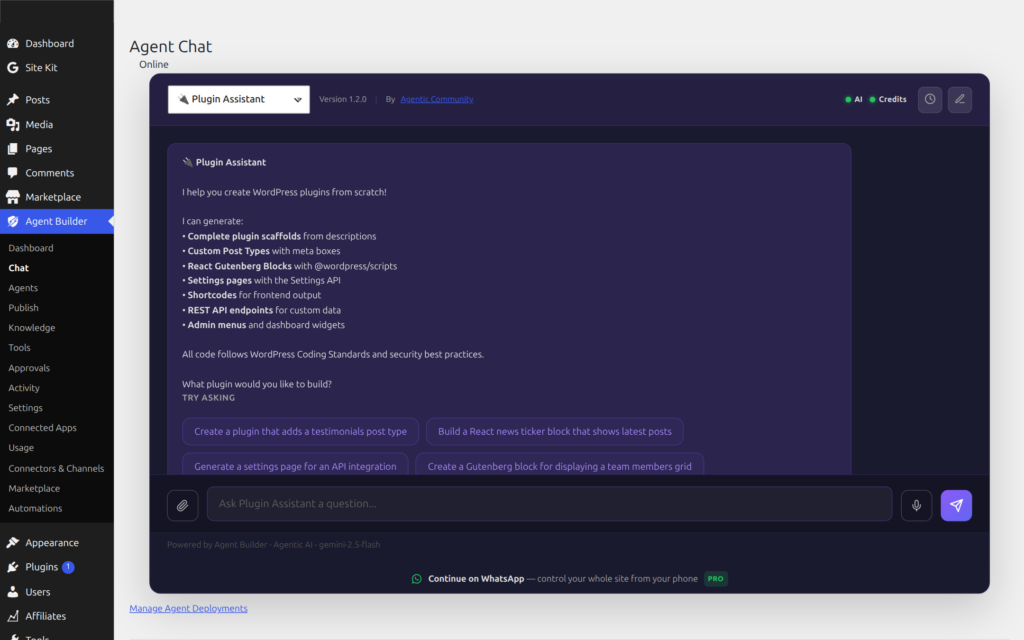
Unlike traditional plugins that add buttons and settings pages, agents work through conversation. You describe what you want, and they figure out how to do it.
How They Work
An agent is a specialist configuration: a role (system prompt), a toolbox (tools it may call), and optional knowledge. Agent Builder builds the prompt, calls your LLM provider, runs tools, and (for risky actions) asks a human to approve.

One chat turn looks like this:

Agents are not one mega-bot. Each specialist has a focused tool set:

Knowledge layers (what the agent “knows”)
Three different systems people often confuse — free vs Pro, local vs cloud:
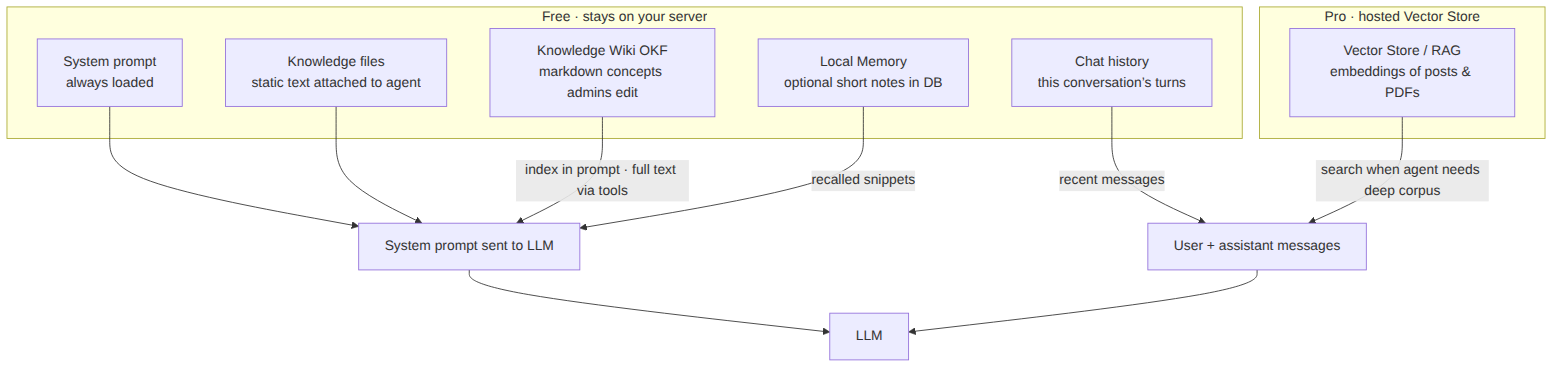
See also: Knowledge Wiki (OKF), Agent Memory, and AI Data Training / Vector Store.
What Can They Do?
- Write and edit content — Blog posts, page copy, product descriptions
- Answer questions about your site — “How many posts did I publish last month?”
- Help with customization — Theme colors, layout changes, CSS tweaks
- Automate routine work — Scheduled reports, content checks, SEO reviews
- Development tasks — Shortcodes, custom post types, plugin modifications
What They Cannot Do
- Access anything outside your WordPress site
- Run medium- or high-risk changes without your approval in Supervised mode, or use extreme-risk tools at all
- Send emails, charge customers, or perform irreversible actions on their own
Where Does My Data Go?
Agents run inside your WordPress installation, and conversation history and logs are stored in your database. Prompts, and the content an agent reads to answer them, are sent to the AI provider you use: our hosted Agentic AI service (processed via Google Vertex AI / Gemini) or a provider you connect with your own key. See Security & Privacy for details.
Frequently Asked Questions
Do I need any coding knowledge to use AI agents?
No. AI agents work entirely through plain English conversation. You type what you want — “draft a product page for my new sneaker line” or “check why my homepage is loading slowly” — and the agent figures out how to do it. No code, no settings, no technical knowledge required. If you want to do something more technical like editing theme files or adding custom PHP, the agent can help with that too, but it will walk you through it conversationally.
Which AI providers does Agent Builder support?
Agent Builder connects to OpenAI (GPT-4o, GPT-4 Turbo), Anthropic (Claude 3.5, Claude 3 Opus), xAI (Grok), Google (Gemini), Mistral, and Ollama for local, offline use. You can configure different providers for different agents — for example, using Claude for creative writing and GPT-4o for code tasks. See Connecting an AI Provider for cost estimates and recommendations for each provider.
Will the agent make changes to my site without asking?
It depends on the action’s risk level and the approval level you choose. In Supervised mode, which is the default, read-only and low-risk actions run automatically, medium-risk actions ask you to confirm in chat, and high-risk actions such as publishing, deleting or changing settings wait in the Approvals queue. Extreme-risk tools are blocked. See Permissions and Safety for the full breakdown.
Can I have multiple AI agents with different specialisations?
Yes. You can run as many agents as you need simultaneously. Agent Builder ships with seven bundled agents covering content writing, SEO, security, site health, AI research, WordPress management, and agent training. You can also install premium agents from the marketplace or build your own using the Assistant Trainer. Each agent has its own system prompt, tools, and configuration — so a customer service bot and a developer agent can run side by side with entirely different personalities and capabilities.
Does Agent Builder send my site content to third parties?
Your site content is sent to the AI provider you use whenever an agent runs. That includes chats, Tasks and scheduled Routines, which run in the background. If you use our hosted Agentic AI service, that provider is Agentic: we process the request via Google Vertex AI / Gemini (and xAI for some features) and keep the first 2,000 characters of image and video prompts for 30 days. If you connect your own provider key, content goes directly from your server to that provider. Each provider has its own data-processing terms; see GDPR and Data Protection. For full data sovereignty, use Ollama to run a local model on your own server.
Related Articles
Ready to put this to work?
Agent Builder is free forever — 8 AI agents, 261 tools, no API key needed.
Download Free Compare Free vs Pro