
Text-to-Speech (TTS) lets your AI assistants speak their responses aloud. Powered by Google Cloud TTS neural voices, it uses prepaid credits from your Agentic credit wallet.
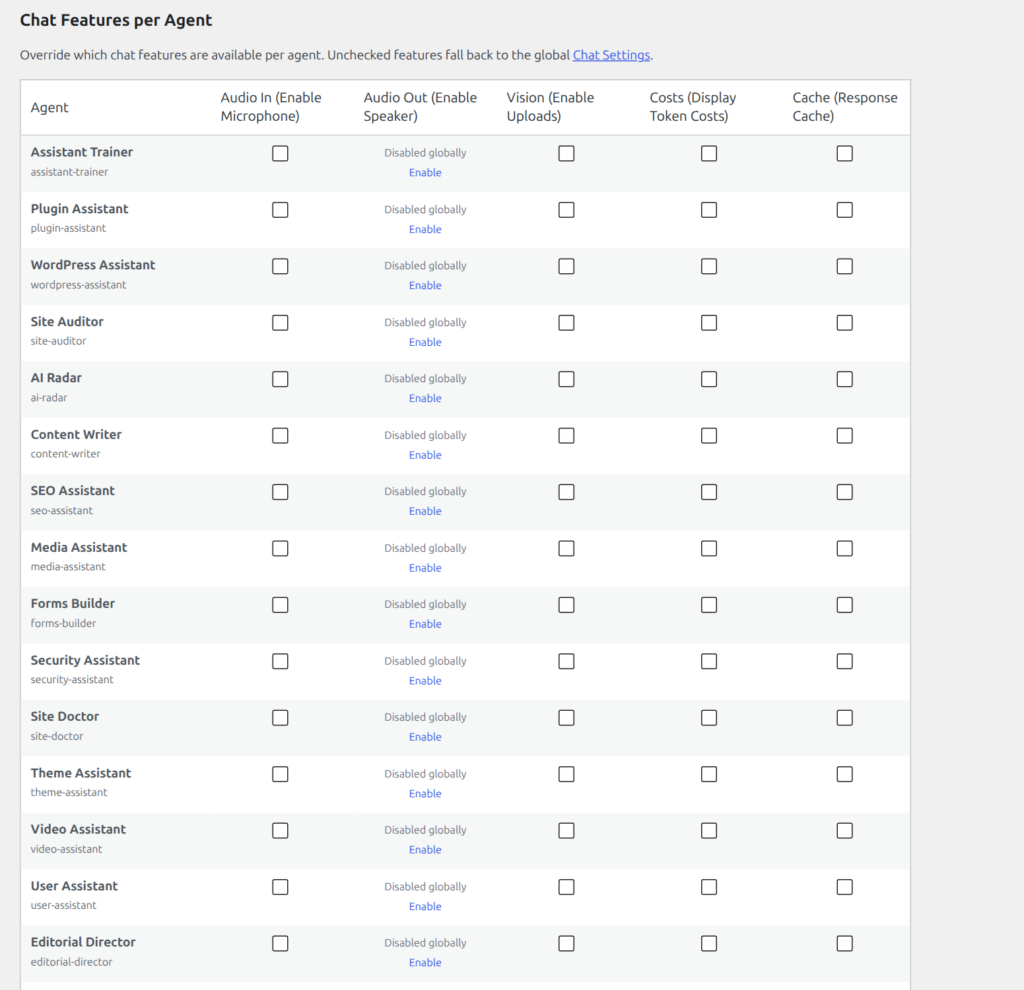
Enabling TTS
- Go to Agent Builder → Settings → Global
- Under Global Chat Settings, enable Text-to-Speech
- Click Save Settings
Once enabled, a speaker icon appears in the chat interface. Click it to hear the assistant’s response read aloud.
Per-Agent Overrides
You can enable or disable TTS per assistant in Settings → Agents → Chat Feature Overrides. The Audio Out column controls TTS for each individual assistant. This is useful when you want TTS on a customer-facing assistant but not on an internal admin tool.
Voice Input vs Text-to-Speech
Agent Builder supports two audio modes that work independently of each other:
- Voice Input (Audio In) — Free. Uses the browser’s built-in speech recognition (Web Speech API). You speak and the browser transcribes your words into the chat input. No credits are consumed.
- Text-to-Speech (Audio Out) — Uses prepaid Agentic credits. The assistant’s text response is sent to Google Cloud TTS, which returns an audio stream that plays in the browser. Credits are consumed per character processed.
Supported Languages and Voices
Agent Builder TTS uses Google Cloud Neural2 and WaveNet voices, covering over 40 languages and more than 300 individual voice variants. Neural2 voices are the highest quality and are recommended for customer-facing deployments. WaveNet voices offer a broader language selection at a lower credit cost.
The voice language is matched to the language setting configured in Settings → Global → Chat Language. If no language is set, TTS defaults to English (US). You can override the voice style on a per-agent basis via the Chat Feature Overrides table.
Credits
TTS draws from your shared Agentic credit wallet — the same pool used by Image Generation and Vector Store. Credits are consumed per 1,000 characters of text processed. A typical assistant response of 150–200 words uses roughly 800–1,100 characters.
Check your balance in Settings → Health → Credit Balance. When your balance runs low, purchase a credit top-up from your account dashboard. If your balance reaches zero, TTS stops working silently — the speaker icon disappears from the chat interface.
Browser Compatibility
TTS audio playback works in all modern browsers including Chrome, Firefox, Safari, and Edge. Voice Input (Audio In) requires Chrome or Edge — Firefox and Safari have limited Web Speech API support. Both features require an HTTPS connection; they will not function on HTTP sites.
Troubleshooting
Speaker icon not appearing: TTS may not be enabled globally or may be disabled for that specific agent. Check Settings → Global → Global Chat Settings and Settings → Agents → Chat Feature Overrides.
Audio plays but cuts off early: This typically indicates a network timeout on the Google Cloud TTS request. It is more common on long responses. Consider enabling a “streaming” response mode so TTS processes the response in shorter segments.
No audio on iOS Safari: iOS requires a user gesture before any audio can play. Tap the speaker icon manually — autoplay on page load is blocked by the browser.
Credits depleted with no warning: Enable low-balance email notifications in Settings → Health to receive an alert before your credit balance hits zero.
Frequently Asked Questions
Does TTS work with every AI provider?
Yes. TTS is handled entirely by Google Cloud on Agentic’s infrastructure — it is not tied to your AI provider. Whether your agent uses OpenAI, Anthropic, Google Gemini, or a local model, TTS works the same way. The assistant’s text output is sent to Google Cloud TTS regardless of which LLM generated it.
Can I choose a specific voice for my assistant?
Voice selection is currently controlled by the language setting. Granular voice selection (choosing between, for example, a male or female Neural2 voice) is on the roadmap. For now, the default voice for each language is the highest-quality Neural2 variant available.
Does TTS work with the WhatsApp or Email channels?
No. TTS is a chat-interface feature — it only functions inside the embedded WordPress chat widget. WhatsApp and Email channels send text responses, and audio playback in those environments is handled by the external platform, not Agent Builder.
Are TTS credits separate from LLM credits?
TTS credits and LLM inference credits come from the same Agentic credit wallet. There is one shared balance. LLM costs are typically higher per interaction, but TTS adds a small additional cost for each response that is spoken aloud. Monitor usage in Settings → Health → Credit Balance.
Can visitors use TTS, or is it admin-only?
TTS is available to all users of the chat interface — including front-end visitors. The speaker icon appears for anyone who interacts with an assistant where TTS is enabled. There is no way to restrict TTS to logged-in users only at this time.
Related Articles
Ready to put this to work?
Agent Builder is free forever — 8 AI agents, 261 tools, no API key needed.
Download Free Compare Free vs Pro