
Overview
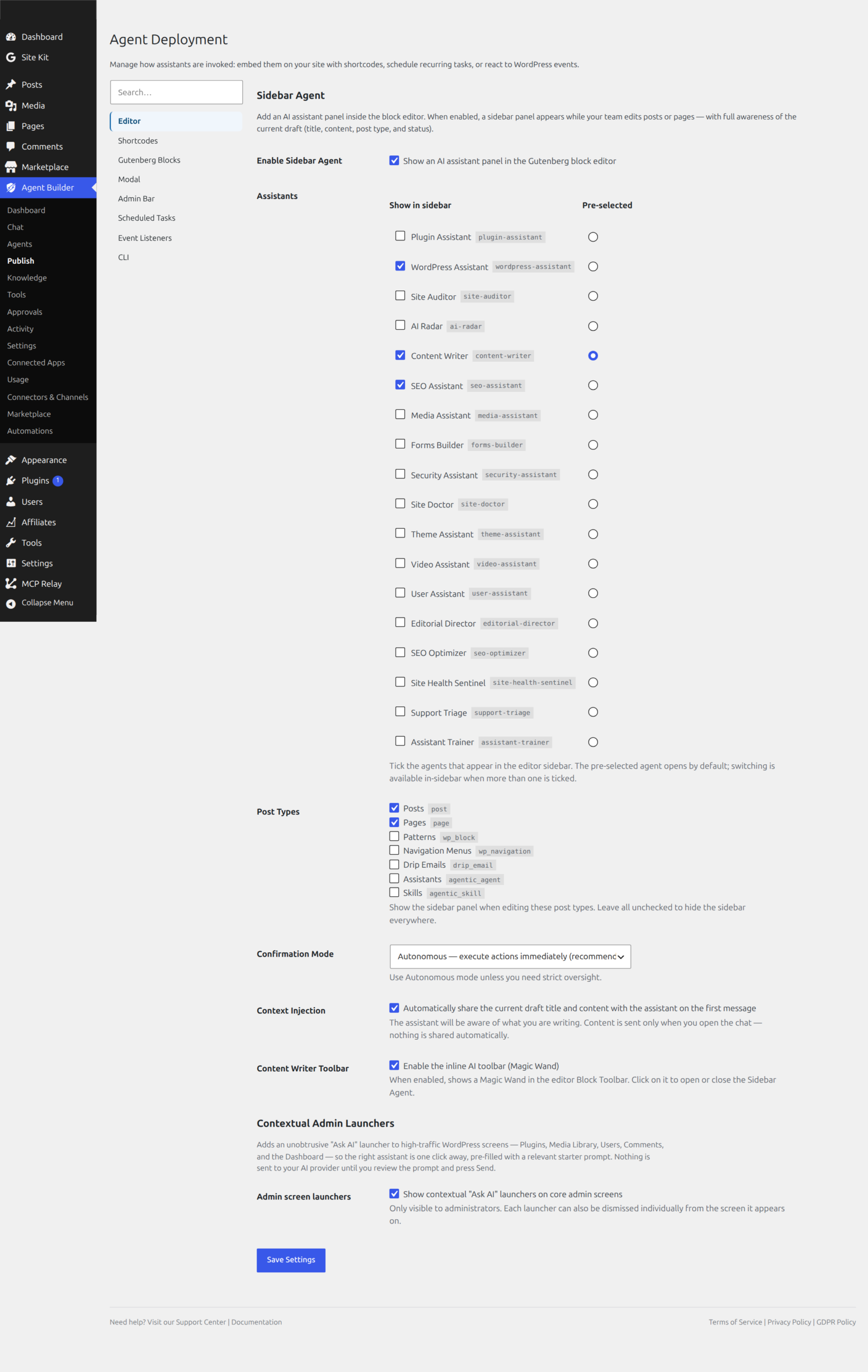
The Admin UI tab in Agent Builder → Publish → Admin UI adds an AI assistant panel inside the Gutenberg block editor. When enabled, a sidebar panel appears while your team edits posts or pages — with full awareness of the current draft’s title, content, post type, and status.
Enabling the Sidebar Agent
Tick Show an AI assistant panel in the Gutenberg block editor to enable the feature. The sidebar panel will appear in the editor for the post types and agents you configure below.
Choosing Assistants
The Assistants section lets you select which agents appear in the editor sidebar and which one opens by default.
- Tick agents in the Show in sidebar column to make them available
- Select one agent in the Pre-selected column — this agent opens automatically when the sidebar panel is first opened
- When more than one agent is enabled, writers can switch between them directly in the sidebar
Post Types
Choose which post types show the sidebar panel. Tick Post, Page, or any registered custom post type. Leave all unchecked to hide the sidebar everywhere.
Confirmation Mode
Controls how the assistant handles actions in the editor.
- Autonomous — executes actions immediately. Recommended for the editor sidebar, where your team is actively reviewing changes in context.
- Supervised — medium-risk actions create a proposal for you to review before executing. Use this if you need strict oversight of every change.
Context Injection
When enabled, the assistant is automatically given the current draft’s title and content when you send your first message. This allows it to immediately help with editing, rewriting, or improving what you are working on — without you having to paste the content manually.
Content is sent only when you open the chat and type a message. Nothing is shared automatically in the background.
Content Writer Toolbar
Enables a Magic Wand button in the Gutenberg Block Toolbar. Clicking it opens or closes the sidebar agent panel without needing to use the sidebar toggle. Useful for writers who prefer to keep the sidebar closed until they need assistance.
Frequently Asked Questions
Can the Gutenberg sidebar agent read what I am currently writing?
Yes — that is the purpose of Context Injection. When enabled, the assistant automatically receives the current draft’s title and full content when you open the chat and type your first message. This means you can ask the agent to “improve the intro”, “shorten this section”, or “check for SEO issues” and it already knows exactly what you are working on. Nothing is shared in the background — data is only sent when you actively type and send a message.
Which post types can display the sidebar agent?
Any post type that uses the Gutenberg block editor can display the sidebar panel. This includes Posts, Pages, and any custom post type that has show_in_rest enabled and uses the block editor. Classic editor post types are not supported — the panel only appears in Gutenberg. Configure which post types show the panel under the Post Types section in the Admin UI settings.
Can editors (not just admins) use the sidebar agent?
Yes. Any user who can access the Gutenberg editor for a post type will see the sidebar panel if it is configured for that post type. Access to individual tools within the agent is still governed by the permissions system — an editor using the sidebar agent will be subject to the same tool restrictions and confirmation requirements as any other user of that agent.
Does using autonomous mode in the editor sidebar mean changes happen without my review?
In autonomous mode, low and medium-risk actions (such as updating post content, changing meta fields, or saving a draft) execute immediately without a confirmation prompt. High-risk and extreme-risk actions still require confirmation regardless of the confirmation mode. For the editor sidebar specifically, autonomous mode is recommended because you are actively watching the editor and can see changes in real time — you can always undo via Ctrl+Z or the block editor’s revision history.
What is the Magic Wand toolbar button?
The Magic Wand is an optional button that appears in the Gutenberg block toolbar (the floating bar above each block). Clicking it opens or closes the sidebar agent panel without needing to use the sidebar’s own toggle icon. It is a shortcut for writers who keep the sidebar collapsed most of the time but want to quickly pull up the assistant when needed. Enable it via the Content Writer Toolbar toggle in the Admin UI settings.
Related Articles
Ready to put this to work?
Agent Builder is free forever — 8 AI agents, 261 tools, no API key needed.
Download Free Compare Free vs Pro