
Agentic Plugin Developer Guidelines
Welcome to the Agentic developer community! Before submitting your assistant, review these guidelines — assistants that meet these standards sail through review and are more likely to be featured in the marketplace.
How Assistants Work (mental model)
An assistant (agent) is a specialist configuration: a role (system prompt / instructions), a toolbox (tools declared by name), and optional knowledge. Agent Builder builds the prompt, calls an LLM, runs tools, and may require human approval for high-risk actions. It is not a separate hosted chatbot product.
Marketplace assistants are declarative: no PHP, no executable code. An assistant is a ZIP containing an agent.json manifest (identity, instructions, capabilities) and an abilities.json file (the tools it may use, with risk levels). Every assistant runs sandboxed inside Agent Builder, so buyers can install with confidence. (Advanced site-local agents may use PHP Agent_Base under wp-content/agentic-agents/ — see Building a Custom Agent.)


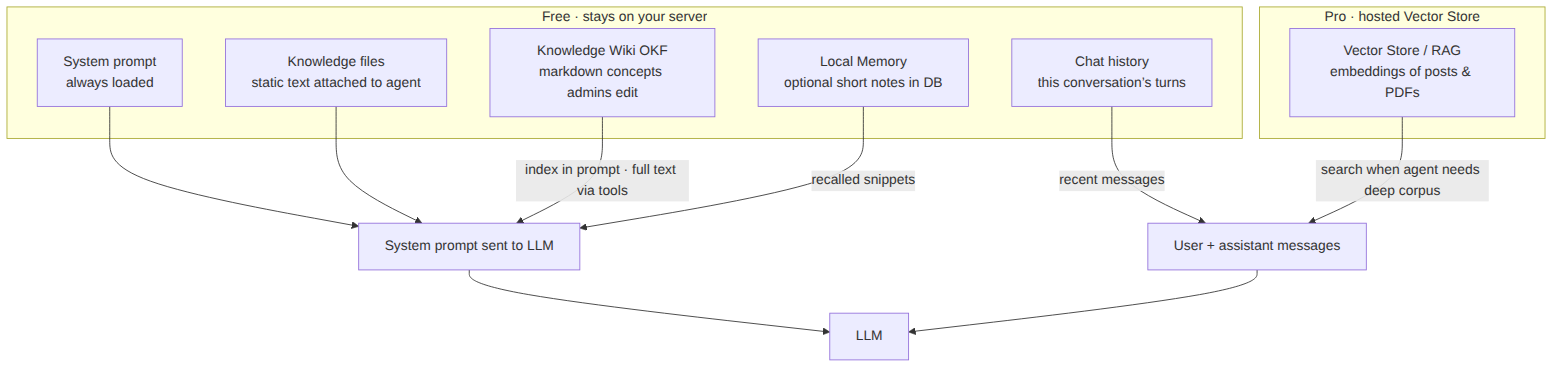
Knowledge vs tools vs memory: tools change WordPress; the free Knowledge Wiki (OKF) teaches curated facts; optional local memory is short continuity; Vector Store is Pro semantic search over large corpora. See also What are AI assistants? and Vector Store / RAG (technical).

1. Manifest Quality Standards
agent.jsonmust be valid JSON with name, description, version, author, and category- Instructions must be clear, specific, and written for the assistant’s actual job — vague prompts produce vague agents
- No obfuscated or misleading manifest content
- No external phone-home behavior without clear disclosure in the README
- Write for the buyer: a site owner should understand what your assistant does from the description alone
2. Security Requirements
- Every ability your assistant uses must be declared in
abilities.jsonwith an honest risk level — undeclared capabilities are grounds for rejection - No hardcoded API keys, passwords, or credentials
- Assistants must not exfiltrate site data, user content, or credentials
- Instructions must not attempt to bypass Agent Builder’s approval and permission system
3. Licensing
- Assistants must be licensed under GPL v2 or later, or a compatible open-source license
- Declare the license in
agent.json - Respect third-party licenses for any bundled assets
- An active Agent Builder license (Personal or Agency) is required to publish on the marketplace
4. Naming Conventions
- Do not use trademarks you do not own in your assistant name (WordPress, OpenAI, Claude, Google, etc.)
- Assistant slugs cannot be changed after approval — choose carefully
- Choose a unique, descriptive name that clearly reflects your assistant’s purpose
- Avoid names that could be confused with Agent Builder’s built-in assistants
5. Required Files
- agent.json — the manifest in the root of your ZIP archive: name, description, version, author, license, category, instructions
- abilities.json — declared tools with risk levels
- README.md — documentation: description, usage instructions, configuration options, and a changelog
- A screenshots/ directory with at least one screenshot of the assistant in action (PNG, max 1MB each)
6. Ability Descriptions
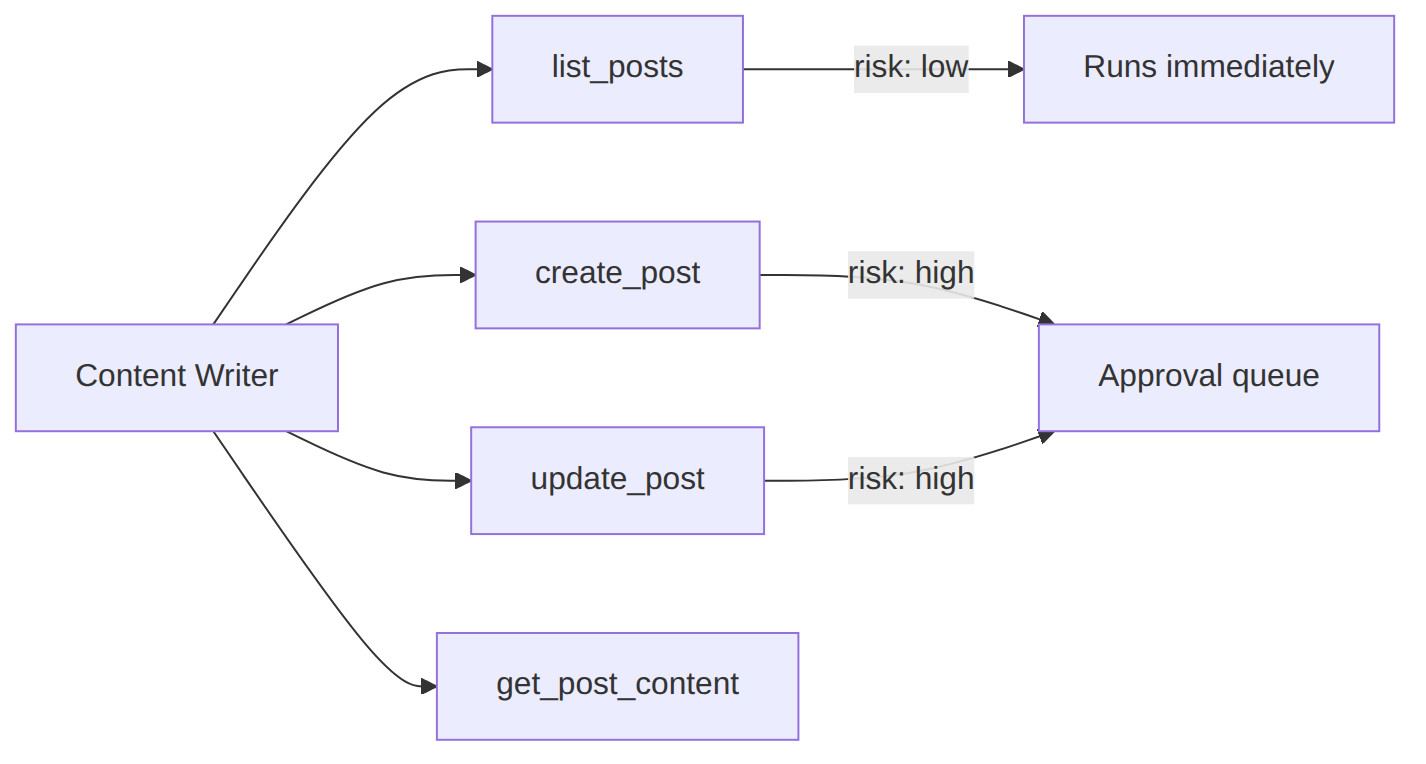
Each ability your assistant declares must include a clear description field — this is what the LLM reads to decide when to use it. Vague descriptions like “does stuff” cause the LLM to misuse or ignore the ability. Write one sentence explaining exactly what the ability does and what it returns.
- Ability names must be lowercase, underscore-separated, and unique within your assistant
- Parameters must include types and descriptions
- Destructive abilities (delete, overwrite, send) must be declared with an appropriate risk level so Agent Builder can require user approval
7. Testing Requirements
Before submitting, verify your assistant against this checklist:
- Tested on WordPress 6.4+ with a current Agent Builder version installed and active
- The manifest loads without errors and all declared abilities behave as documented
- Tested with at least two different AI providers (e.g., OpenAI GPT-4o and Anthropic Claude)
- Destructive actions correctly trigger Agent Builder’s approval prompt
- The README matches the assistant’s actual behavior
8. Review Process
After submission, your assistant enters our review queue. We typically review submissions within 1–2 business days. During review we check: manifest quality, security, licensing compliance, README completeness, and that abilities behave as documented. You will receive an email with the outcome. If your assistant is rejected, the email includes specific feedback on what to change before resubmitting.
Common Rejection Reasons
- Missing or invalid
agent.json/abilities.json - Undeclared capabilities, or risk levels that understate what the assistant does
- Misleading descriptions that don’t match actual behavior
- Assistant slug or name that infringes on a trademark
- README missing usage instructions
Ready to Submit?
Frequently Asked Questions
Can I submit a paid/premium assistant?
Yes. Premium assistants are welcome on the marketplace — set your own price (minimum $4.99), or use a freemium model with a free listing. You keep 70% of every sale, paid out monthly via Stripe Connect once your balance reaches $50.
Can I update my assistant after it has been approved?
Yes. Submit an updated ZIP through the developer portal with an incremented version number and an updated changelog in your README. Updates go through the same review, typically within 1–2 business days.
What happens if my assistant is rejected?
You will receive an email with a list of specific issues to address. Fix each item, increment the version number, and resubmit. There is no limit on resubmissions. If you disagree with a rejection reason, reply to the review email and our team will take a second look.
Can my assistant connect to external APIs or services?
Yes, but all external connections must be disclosed in the README under a “Third-Party Services” section, and declared in abilities.json. Users must be able to opt out of non-essential external connections. Connections that transmit user data must be covered by a privacy policy linked in your README.
Who handles errors — me or Agent Builder?
Agent Builder. Your assistant ships no executable code; abilities are declared in abilities.json and executed by the platform in a sandbox. When something fails, the error surfaces to the user in chat automatically. Your job is accurate declarations and clear instructions.
Is there a limit to how many abilities an assistant can declare?
There is no hard limit in the platform, but practical LLM context limits apply. Most LLMs handle up to 64 tools reliably; beyond that, selection accuracy drops. If your assistant needs many abilities, group them logically and consider splitting them into separate assistants.