
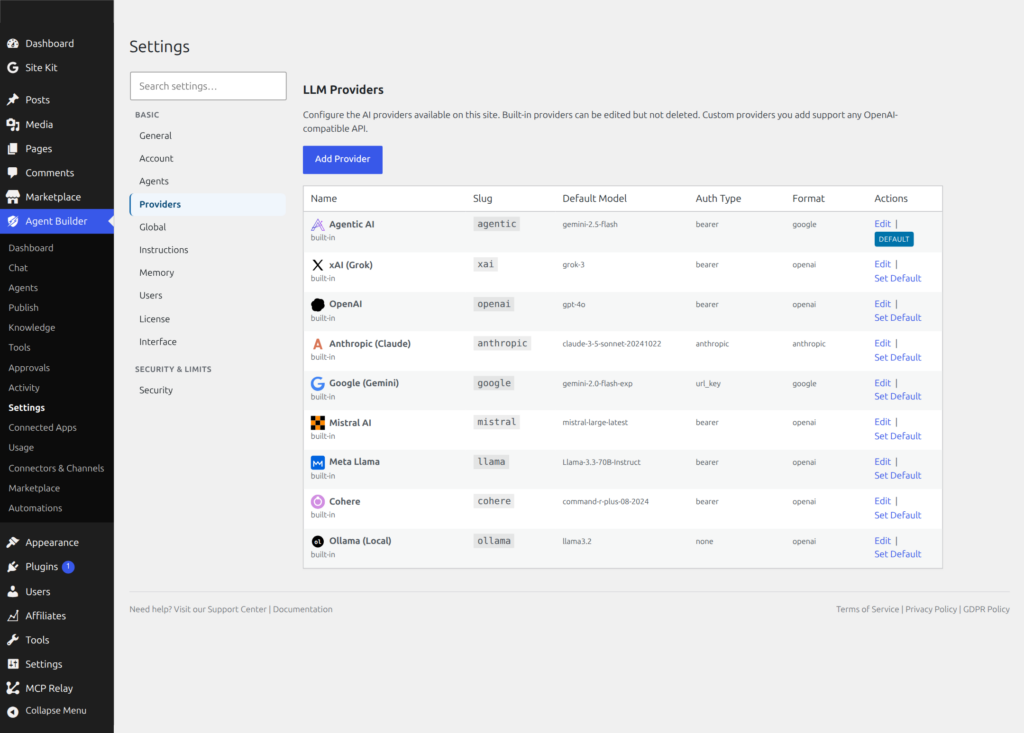
Agent Builder works with nine LLM providers. They all work well for general WordPress tasks — the differences come down to cost, privacy, and what you’re asking your AI assistants to do.
Quick recommendation
- No API key? Just want to try? Use Agentic AI (Experimental). The default provider — activate and go, no account needed. Free with a Plugin License.
- Just getting started? Use OpenAI. Five dollars of free credit, easy setup, and the widest support across all assistants.
- Mostly writing content? Try Anthropic Claude. Its writing quality and instruction-following are exceptional.
- Want the lowest cost? Use Google Gemini Flash. It has a generous free tier and very low pay-as-you-go pricing.
- Privacy-first or EU-based site? Consider Mistral (European provider) or Ollama (fully local — nothing leaves your server).
- Running code generation tasks? Mistral and Anthropic both perform well on code.
- Troubleshooting
Provider comparison
| Provider | Free tier | Typical cost | Best for | Notes |
|---|---|---|---|---|
| OpenAI | ~$5 trial credit | Low–medium | All-round tasks, content, code | The most widely used provider. GPT-4o handles every built-in assistant well. Easy to set up. |
| Anthropic | None | Medium | Long-form writing, analysis, complex instructions | Claude produces very natural prose. Excellent for content-heavy sites. No free trial — requires a paid account from the start. |
| xAI (Grok) | Limited free tier | Low–medium | General tasks, current-events questions | Grok has a recent training cutoff and handles current-events questions well. Competitive pricing. |
| Google (Gemini) | Yes — Gemini Flash is free within generous limits | Very low | High-volume tasks, cost-sensitive setups | Gemini Flash is the most affordable option for sites with heavy usage. Gemini Pro is comparable to GPT-4o quality. |
| Mistral | None | Low | Code generation, European data residency | A French provider — data processing stays in the EU, which simplifies GDPR compliance. Strong at structured tasks and code. |
| Agentic AI (Experimental) | Free with Plugin License | Free | Getting started, no-config setups, WordPress tasks | WordPress-optimised model hosted by agentic-plugin.com. No account or API key required. Shared pool — may be slower under load. |
| Meta Llama | None | Low | General tasks, cost-conscious setups | Meta’s open-weight model served via API. Competitive pricing for high-volume use. |
| Cohere | Free tier available | Low | Text generation, RAG workflows | Strong at document and retrieval-augmented tasks. Free tier available for low-volume usage. |
| Ollama (local) | Free forever | $0 (your hardware) | Complete privacy, no internet dependency | Runs entirely on your server or a local machine. No data leaves your infrastructure. Requires a capable server — not suitable for shared hosting. |
What about cost?
LLM providers charge by the token (roughly three-quarters of a word). A typical chat exchange uses 300–1,000 tokens. Content generation tasks use more. See Connecting an AI Provider for a full explanation of tokens and how to monitor your spending.
Rough monthly cost for a site running assistants moderately (a few dozen tasks per day):
- Google Gemini Flash: $1–$5/month
- Mistral, xAI: $3–$10/month
- OpenAI GPT-4o: $5–$20/month
- Anthropic Claude: $5–$25/month
- Agentic AI: Free with paid Plugin License
- Meta Llama: $2–$8/month
- Cohere: $2–$8/month
- Ollama: $0 (electricity only)
These are rough estimates — actual costs vary with usage volume and the model you choose. Set a monthly spending cap in your provider’s dashboard to avoid surprises.
Can I switch LLM provider later?
Yes — you can switch at any time, in two ways:
- From the Dashboard: Go to Agent Builder → Dashboard. The Status card lists all your connected providers. Click Set as Default next to any provider to switch immediately. Your previously saved model preference for that provider is restored automatically.
- From Settings: Go to Agent Builder → Settings → Providers, select the provider, choose a model, and save.
All assistants using the global provider setting will use the new default immediately. Assistants with a per-assistant provider override are not affected.
Can I use different LLM providers for different AI agents?
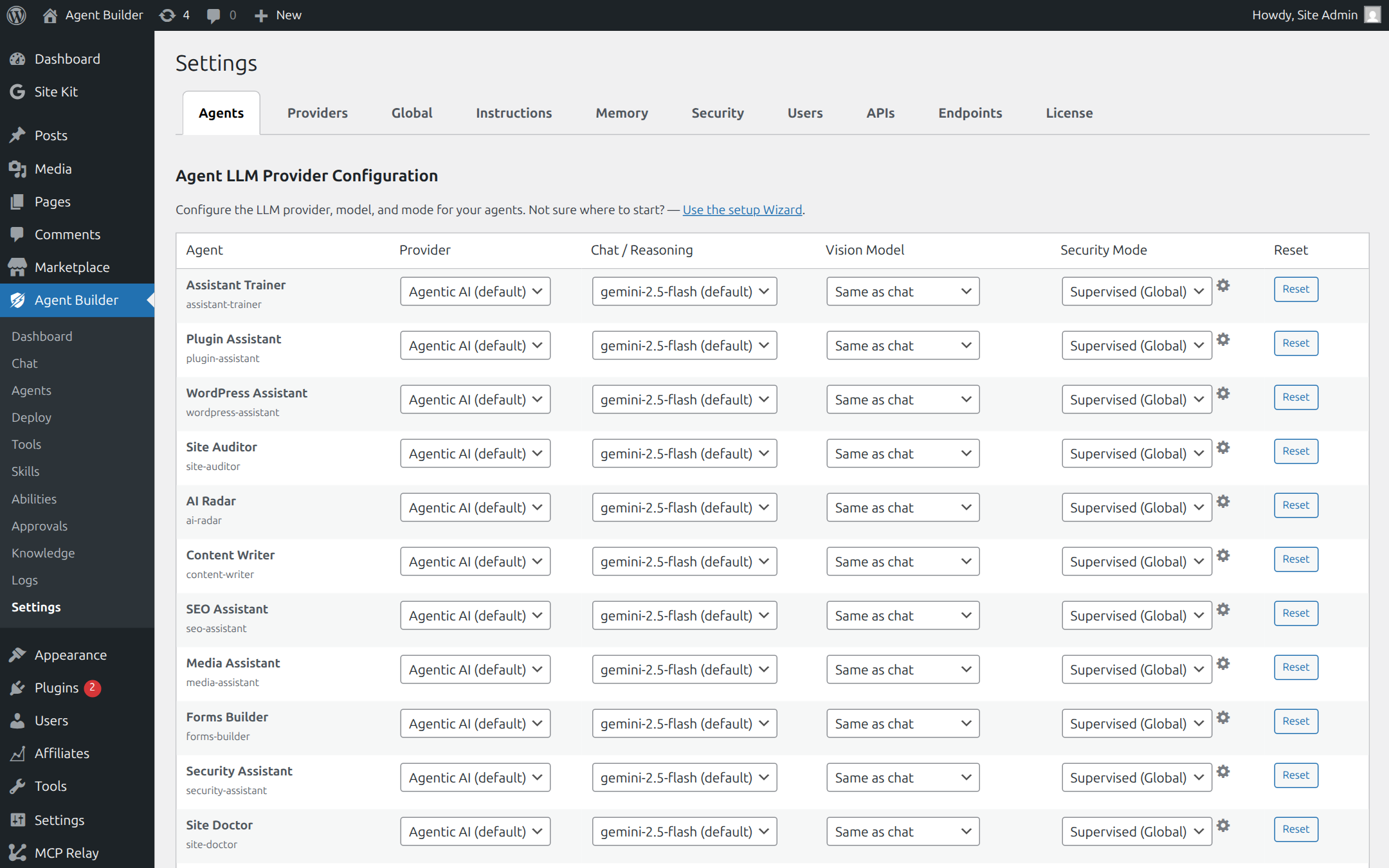
Yes. In Agent Builder → Settings → Agents, the Agent Configuration table lets you override the provider, model, and mode for each assistant individually. For example, you can run your Content Writer on Google Gemini Flash for low cost while keeping your Security Assistant on Anthropic Claude for deeper analysis. Only providers you have already connected appear in the dropdown. See Settings for details.
Related Articles
Ready to put this to work?
Agent Builder is free forever — 8 AI agents, 261 tools, no API key needed.
Download Free Compare Free vs Pro