
Watch the video walkthrough below, or follow the step-by-step guide further down this page.
What is Agent Builder?
Agent Builder is a WordPress plugin that adds AI-powered assistants to your site. These assistants can help you write content, manage your site, customise your theme, and automate routine tasks — all through a simple chat interface.
Requirements
- WordPress 6.4 or higher
- PHP 8.1 or higher (check with your host)
- An API key from an AI provider (OpenAI, Anthropic, xAI, Google, Mistral) or a local Ollama installation
Installation
- In your WordPress admin, go to Plugins → Add New
- Search for Agent Builder
- Click Install Now, then Activate
- You will see a new Agent Builder menu item in your admin sidebar
Connect an AI Provider
On first activation, the Setup Wizard opens automatically. It guides you through:
- Choosing a provider (xAI, OpenAI, Anthropic, Google, Mistral, or Ollama) with pricing details and recommendations
- Creating an account and getting your API key (with step-by-step screenshots)
- Selecting a model and testing the connection
You can also configure everything manually in Agent Builder → Settings. Not sure which provider to use? Start with xAI — new accounts get $25 in free credits. Or use Ollama for a free, fully local option.
Tip: You can re-run the Setup Wizard at any time from the Agent Builder → Dashboard.
Activate Your License
If you purchased a premium assistant or a plugin license from our marketplace, activating your license key unlocks automatic updates and marketplace access.
- Go to Agent Builder → Settings → Account
- Enter your license key (format:
AGNT-XXXX-XXXX-XXXX-XXXX) and click Activate License - You will see a green confirmation when the license is active
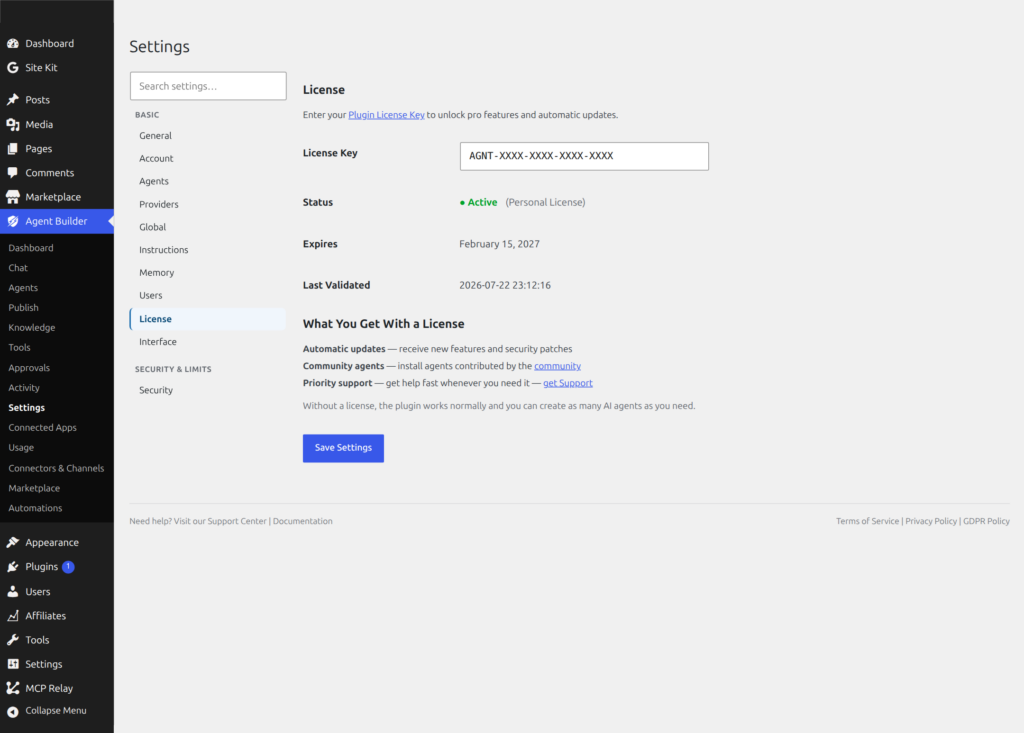
Tip: Your license key was emailed to you at purchase. If you cannot find it, check your spam folder or visit My Account.
Start Using Your Assistants
- Go to Agent Builder → Installed Agents and activate the assistants you want to use
- Go to Agent Builder → Agent Chat and start a conversation
Your eight free built-in agents are ready to use immediately: WordPress Assistant, Content Writer, SEO Optimizer, Site Health Sentinel, Support Triage, User Assistant, Editorial Director, and Assistant Trainer. An Agent Builder Pro license adds nine Pro specialists — including SEO Assistant, Security Assistant, Site Doctor, and AI Radar.
Need Help?
Visit our Support page, check the FAQ, or browse the full Documentation.
Frequently Asked Questions
What happens if I skip the Setup Wizard?
The Setup Wizard is optional — you can skip it and configure everything manually in Agent Builder → Settings. If you skip it, no assistants will work until you add at least one AI provider API key under Settings → AI Providers. The wizard is recommended for first-time users because it validates your API key and tests the connection before you try to use any assistant. You can relaunch the wizard at any time from Agent Builder → Dashboard if you want to add a second provider or change your model selection.
My API key test failed — what should I check?
First, confirm the key was copied correctly with no leading or trailing spaces. API keys from OpenAI start with sk-, Anthropic keys start with sk-ant-, and xAI keys start with xai-. Second, check that your key has sufficient credits or an active billing method — a key with no balance will fail the test even if the key itself is valid. Third, verify your server can reach the provider’s API endpoint by asking your host whether outbound HTTPS requests are allowed. Shared hosts occasionally block outbound connections. See Connecting an AI Provider for provider-specific troubleshooting.
Can I use Agent Builder on WordPress Multisite?
Yes. Install Agent Builder network-wide from the Network Admin → Plugins screen, or activate it on individual sites within the network. Each site gets its own independent configuration — separate API keys, separate agent settings, and separate memory and audit logs. The license key is entered once per site (or once per network if you manage it centrally). Agency license holders can activate on up to 25 sites, which covers most multisite networks. If you need more, contact support for a volume arrangement.
Does Agent Builder work with page builders like Elementor or Divi?
Agent Builder itself is not a page builder — it is an AI assistant that lives in your WordPress admin. It works alongside any theme or page builder you use. The Gutenberg sidebar agent (deployed via Admin UI) only appears in the native block editor and is not available within Elementor or Divi’s editors. All other features — admin chat, admin bar overlay, scheduled tasks, event automation, and frontend shortcode chat — work regardless of which page builder or theme you use.
Is there a way to try Agent Builder without connecting an AI provider?
Not currently — Agent Builder requires an AI provider to process conversations. However, getting started with a free provider is straightforward: xAI gives new accounts $25 in free credits (no credit card required for the free tier), and Ollama is completely free with no API key needed if you run it locally.