
What Are Scheduled Tasks?
Some assistants can run automatically on a schedule without you being logged in. For example, the Security Assistant runs a daily security scan, and AI Radar performs a weekly visibility check. This is ideal for recurring maintenance, monitoring, and reporting.
How It Works
- An assistant defines its tasks internally (developers use
get_scheduled_tasks()). - When the assistant is activated, the tasks are registered with WordPress cron.
- WP-Cron fires the task on schedule.
- If the task uses AI mode, it runs through the LLM with full reasoning and tool access. Otherwise it runs a PHP callback directly.
- Every execution is recorded in the Audit Log with timing, mode, and outcome.
Two Execution Modes
| Mode | How It Runs | When to Use |
|---|---|---|
| 🤖 AI (Autonomous) | Sent to the LLM with full reasoning and tool access | Complex analysis, content generation, multi-step workflows |
| ⚙️ Direct | Calls a PHP callback method | Simple, predictable tasks like cache clearing or data cleanup |
If the AI provider is not configured, autonomous tasks gracefully fall back to direct mode — nothing breaks.
Managing Scheduled Tasks
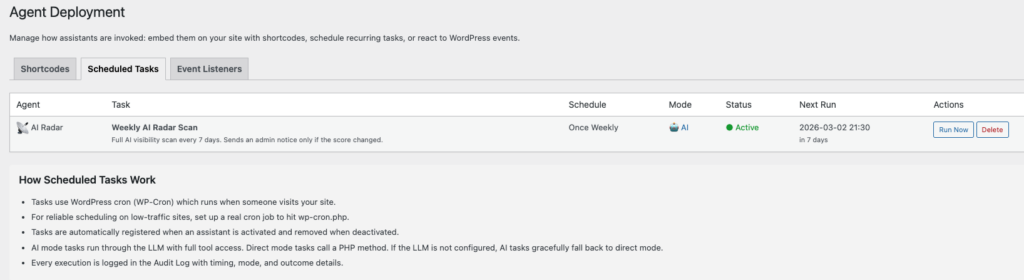
Go to Agentic → Deployment → Scheduled Tasks to see all tasks defined by your active assistants. Each row shows:
- Agent — which assistant owns the task
- Task name and description
- Schedule — how often it runs (hourly, daily, weekly, etc.)
- Mode — AI or Direct
- Status — Active (green) or Not Scheduled (red)
- Next Run — when it will fire next, with a human-readable countdown
Actions
- Run Now — execute the task immediately. Opens a dedicated task runner page with live output.
- Delete — remove the cron event from the WordPress queue. The task definition remains (it is part of the assistant’s code), but it will no longer run automatically. Status changes to “Not Scheduled”.
- Schedule — re-register a previously deleted task. Restores the cron event with the original recurrence (daily, weekly, etc.).
Deleting a scheduled task does not deactivate the assistant — it only stops that one cron job. You can bring it back at any time with the Schedule button.
Common Uses
- Weekly AI visibility scan: AI Radar checks your robots.txt, schema markup, and content structure
- Daily security scan: Security Assistant checks for failed logins, outdated plugins, and modified files
- Daily SEO check: Verify meta descriptions, headings, and alt text on new content
- Weekly content audit: Check for broken links, outdated posts, and missing images
Event Listeners
Assistants can also react to WordPress events as they happen — like a settings change, plugin activation, or failed login attempt. Unlike scheduled tasks that run at fixed intervals, event listeners fire in real time when something specific occurs on your site.
How Event Listeners Work
- An assistant defines which WordPress hooks (events) it wants to monitor.
- When your site loads, the plugin binds those listeners to their hooks.
- When a hook fires, the callback checks if the event is relevant.
- If the event is not relevant (e.g. a settings change to an unrelated option), it is silently ignored — no log noise.
- If the event is relevant, the callback does its work and the action is recorded in the Audit Log.
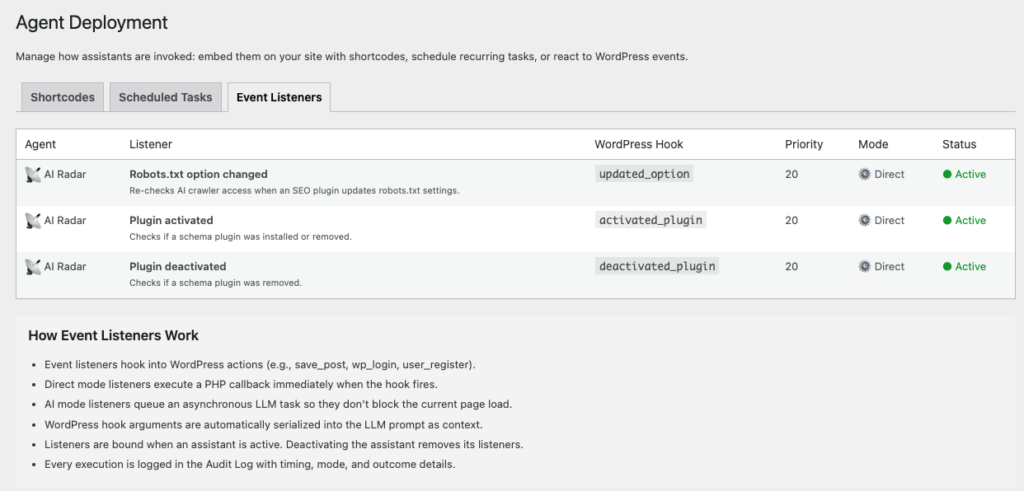
For example, AI Radar listens to the updated_option hook but only reacts to robots.txt-related settings. All other option changes are silently skipped.
Viewing Event Listeners
Go to Agentic → Deployment → Event Listeners to see all active listeners, their hooks, priorities, and execution modes.
WP-Cron Reliability
WordPress cron depends on site traffic to trigger scheduled events. On low-traffic sites, tasks may run slightly later than scheduled. For precise timing, set up a real server cron job:
*/5 * * * * curl -s https://yoursite.com/wp-cron.php > /dev/null 2>&1This hits WP-Cron every 5 minutes regardless of traffic. Ask your hosting provider if you are unsure how to set this up.
For Developers
See the Architecture documentation for the full developer reference on get_scheduled_tasks() and get_event_listeners(), including code examples and the callback return value convention for controlling audit log behaviour.
Scheduled tasks since v1.4.0. Event listeners since v1.5.0. Schedule/Delete buttons added in v1.9.5.