
What is Agent Builder?
Agent Builder is a WordPress plugin that adds AI-powered assistants to your site. These assistants can help you write content, manage your site, customise your theme, and automate routine tasks — all through a simple chat interface.
Requirements
- WordPress 6.4 or higher
- PHP 8.1 or higher (check with your host)
- An API key from an AI provider (OpenAI, Anthropic, xAI, Google, Mistral) or a local Ollama installation
Installation
- In your WordPress admin, go to Plugins → Add New
- Search for Agent Builder
- Click Install Now, then Activate
- You will see a new Agent Builder menu item in your admin sidebar
Connect an AI Provider
On first activation, the Setup Wizard opens automatically. It guides you through:
- Choosing a provider (xAI, OpenAI, Anthropic, Google, Mistral, or Ollama) with pricing details and recommendations
- Creating an account and getting your API key (with step-by-step screenshots)
- Selecting a model and testing the connection
You can also configure everything manually in Agent Builder → Settings. Not sure which provider to use? Start with xAI — new accounts get $25 in free credits. Or use Ollama for a free, fully local option.
Tip: You can re-run the Setup Wizard at any time from the Agent Builder → Dashboard.
Activate Your License
If you purchased a premium assistant or a plugin license from our marketplace, activating your license key unlocks automatic updates and marketplace access.
- Go to Agent Builder → Settings → License
- Enter your license key (format:
AGNT-XXXX-XXXX-XXXX-XXXX) and click Activate License - You will see a green confirmation when the license is active
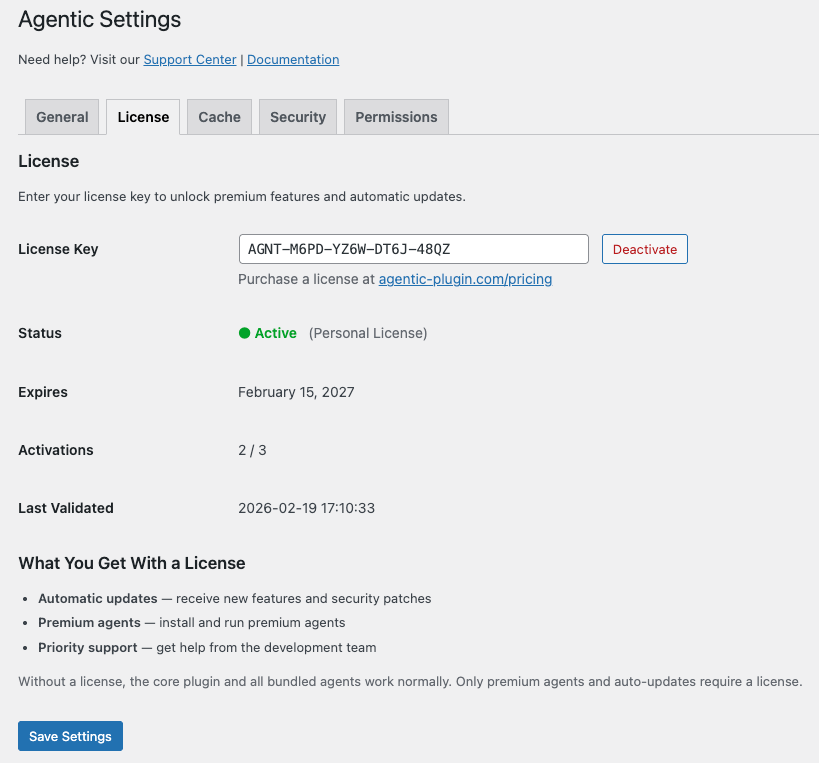
Tip: Your license key was emailed to you at purchase. If you cannot find it, check your spam folder or visit My Account.
Start Using Your Assistants
- Go to Agent Builder → Installed Agents and activate the assistants you want to use
- Go to Agent Builder → Agent Chat and start a conversation
Your seven bundled assistants are free and ready to use immediately: Content Writer, SEO Assistant, Security Assistant, Site Doctor, AI Radar, WordPress Assistant, and Assistant Trainer.
Need Help?
Visit our Support page, check the FAQ, or browse the full Documentation.