Best Free AI Agents for WordPress in 2026
 Agentic Community
Mar 30, 2026
5 min read
Agentic Community
Mar 30, 2026
5 min read
WordPress powers 43% of the web. And in 2026, AI is not optional anymore — it is the difference between a site that runs itself and one that eats your evenings.
But here is the problem: there are dozens of AI plugins for WordPress, and most of them just wrap ChatGPT in a widget. The real shift is AI agents — assistants that do not just generate text, but actually take action inside your WordPress dashboard. They audit your SEO, monitor security threats, clean up database bloat, and publish content while you sleep.
We tested the leading options and ranked them by what matters: can they actually do the work, or do they just talk about it?
The short version: Agent Builder is the only free option that needs no API key and takes real action out of the box — 8 built-in agents for content, SEO, site health, and support, with 261 tools. AI Engine is the flexible developer choice if you are happy managing your own keys. Elementor AI only makes sense inside Elementor.
What Makes an AI Agent Different from an AI Plugin?
A traditional AI plugin gives you a text box. You type a prompt, it returns a response. You copy, paste, format, and publish manually.
An AI agent goes further. It has tools — the ability to read your database, check your plugins, edit your posts, scan for vulnerabilities, and take action based on what it finds. The difference is like asking someone for directions versus handing them the steering wheel.
The Best Free AI Agents for WordPress
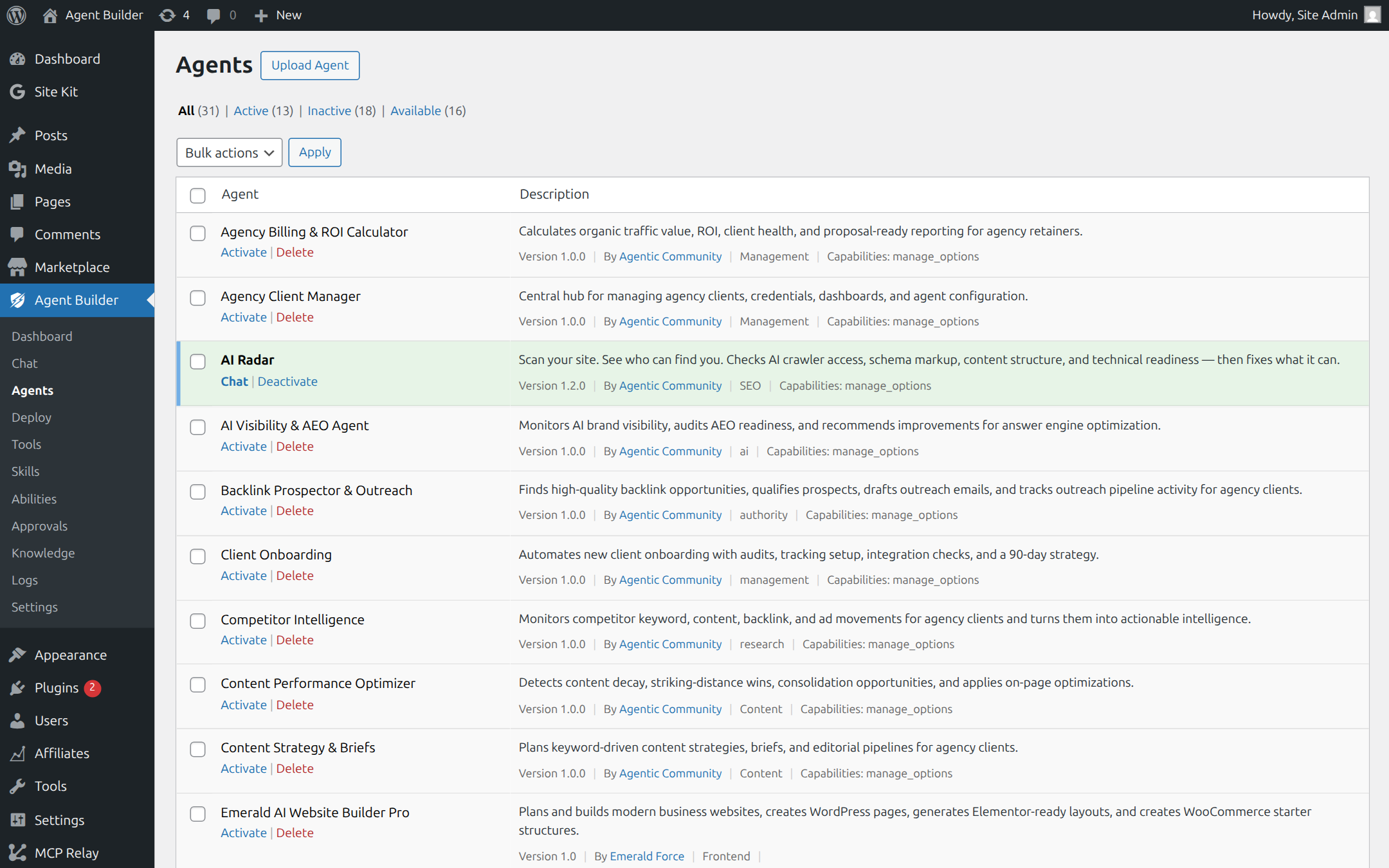
1. Agent Builder (agentic-plugin.com)
Best for: Site owners who want a full AI team without writing code or managing API keys.
Agent Builder ships with 8 free built-in agents — content writing, SEO, site health monitoring, support triage, user management, and more. Each one has real tools: the SEO Optimizer does not just suggest fixes, it rewrites your meta descriptions. The Site Health Sentinel does not just warn you about pending updates, it shows you the PHP errors and database bloat behind them.
The standout feature is the Assistant Trainer — describe what you need in plain English, and it builds a custom AI agent for you. No code, no configuration files, no API key required. It works immediately using built-in AI.
Free tier: Unlimited agents, all 8 built-in agents, 261 tools, free daily AI credits with an Agentic AI account, scheduled tasks, event triggers, Gutenberg blocks. The free version is genuinely complete — you do not hit a wall after a trial period.
Paid plans: Personal ($59/yr, 3 sites) and Agency ($149/yr, 25 sites) add 9 Pro specialist agents (security, performance, media), channels like WhatsApp and Slack, MCP integration, white-label branding, and vector store RAG training.
Limitation: Newer to the market than some alternatives, so community resources are still growing.
2. AI Engine (Meow Apps)
Best for: Developers who want maximum flexibility and do not mind managing API keys.
AI Engine is one of the most-installed AI plugins for WordPress. It provides chatbots, content generation, image creation, embeddings, and MCP server support so external AI tools can connect to your site.
It supports OpenAI, Anthropic, Google Gemini, and others. The breadth is impressive — if you want to build something custom, AI Engine gives you the building blocks.
Free tier: Core features including chatbot and content generation. Pro from $49/year.
Limitation: Requires your own API keys, which means ongoing costs from OpenAI or Anthropic on top of the plugin price. Configuration is complex for non-technical users.
3. Elementor AI
Best for: Elementor users who want AI inside their page builder.
Elementor AI generates text, images, custom CSS, and code directly inside the visual editor, tightly integrated with Elementor’s widgets and layout tools.
Free tier: Limited free trial credits, then a subscription.
Limitation: Only works inside Elementor. If you use Gutenberg or another builder, it is not an option. Credit-based pricing adds up with heavy use.
4. AI Workflow Automation (AI Agent Hub)
Best for: Power users who want to chain multiple AI models together in workflows.
AI Agent Hub provides a broad set of AI abilities, a built-in MCP server, AI experiments in the Gutenberg editor, and a visual workflow builder. Think Zapier meets ChatGPT inside WordPress.
Free tier: Available with limited features. Premium unlocks full workflow capabilities.
Limitation: The breadth can be overwhelming. Steeper learning curve than simpler alternatives.
5. AI Power
Best for: WooCommerce store owners who need bulk product descriptions.
AI Power is one of the original AI content plugins for WordPress. It handles content generation, chatbots, image creation, text-to-speech, and has strong WooCommerce integration for generating product descriptions at scale.
Free tier: Full functionality with a bring-your-own API key model.
Limitation: Bring-your-own-key only, so costs scale with your API usage. The UI can feel cluttered given the feature sprawl.
Quick Comparison
| Plugin | No API Key Needed | Takes Actions | Built-in Agents | MCP Support | Free Tier |
|---|---|---|---|---|---|
| Agent Builder | Yes | Yes | 8 | Yes (licensed) | Full |
| AI Engine | No | Limited | — | Yes | Core features |
| Elementor AI | No | Elementor only | 1 | Yes | Limited credits |
| AI Agent Hub | No | Yes | — | Yes | Limited |
| AI Power | No | No | — | No | Full (BYOK) |
Which One Should You Choose?
If you want the simplest path to AI in WordPress — no API keys, no configuration, agents that work immediately — Agent Builder is the clear choice. Install, activate, and your AI team starts working.
If you are a developer who wants to build custom integrations — AI Engine gives you the most flexibility, but expect to invest time in configuration and budget for API costs.
If you are already using Elementor — Elementor AI is the path of least resistance, but you are locked into that ecosystem.
The WordPress AI landscape is moving fast. What all these plugins share is a shift from passive tools to active agents — AI that does the work, not just talks about it. The free tiers are generous enough to try several without commitment.
Frequently Asked Questions
Do I really not need an API key for Agent Builder?
Correct. Create a free Agentic AI account inside the plugin and you get 20 queries / 50,000 tokens per day at no cost. You can add your own OpenAI, Anthropic, or Google key later if you want higher limits.
Are free AI agents actually good enough for a real site?
For content drafting, SEO fixes, health monitoring, and support triage — yes. The free tier is the full plugin, not a trial. You only need Pro for channels (WhatsApp, Slack), the 9 specialist agents, and MCP.
What is the difference between an AI plugin and an AI agent?
A plugin generates text for you to copy and paste. An agent has tools — it can read your database, edit posts, and check your site directly, then act on what it finds with your approval.
Can I use more than one of these plugins together?
You can, but there is overlap. Pick one agent platform — running two chatbot frameworks side by side mainly costs you performance and confusion.